Shape and size
Switch between circle, oval, rectangle, and triangle outlines, then pick a standard size or enter a custom diameter, width, and height.
Free to design · Pay only to export
Build a company seal, rubber stamp, date stamp, or logo stamp in the browser. Designing and previewing is free; export a transparent PNG from $2.50 or a full vector bundle when the design is ready.
SealsDigital Studio
Create your own stamp © sealsdigital.com
Visual stamp artwork The exported mark is an image asset, not a cryptographic electronic seal or digital signature.
Review before use Confirm local document, company, and professional requirements before applying a mark.
Free to design Every template and control is available before checkout. The preview carries a watermark; the files you buy do not.
Built for practical document work
This page gives the stamp maker online a full-width workspace. Every template keeps its shapes, curved text, borders, and uploaded artwork editable, so a new stamp design can be reviewed before export instead of being flattened into a picture. The same online stamp maker also sits directly under the introduction on the homepage.
Begin with the document the stamp is for. Company approvals, received marks, address layouts, and date stamps need different spacing and hierarchy, so the online stamp design templates are grouped by use case. If you are still looking for a direction, a stamp online workflow shows how one mark is reused across invoices, forms, and PDFs.
When the design is ready, choose a transparent PNG for everyday documents or a vector bundle for printing. Single exports start at $2.50, and the free PDF stamp tool places the finished artwork on a document without another purchase. For more layout ideas, browse the seal maker guides.
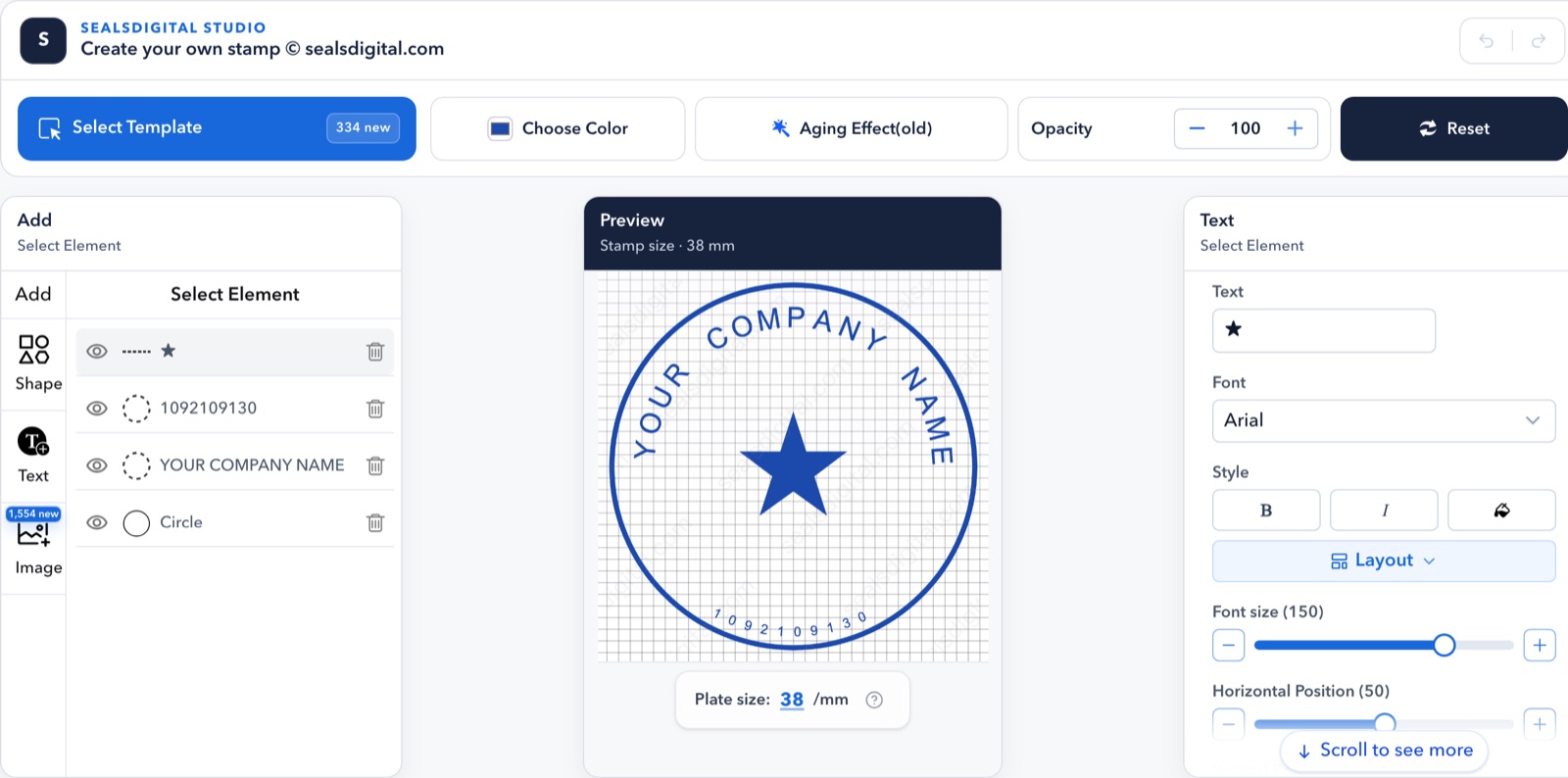
Inside the editor
Switch between circle, oval, rectangle, and triangle outlines, then pick a standard size or enter a custom diameter, width, and height.
Edit every text line separately. Change the font, size, color, letter spacing, and position so the outer ring sits evenly inside a round seal.
Choose single, double, triple, dashed, dotted, or vintage borders, then add stars, lines, and polygons. Each shape keeps its own stroke width, so thin details can be strengthened before export.
Upload a logo or picture in SVG or PNG. It scales proportionally, and SVG artwork stays sharp at every export size.
Use any ink color, lower the opacity for a softer impression, or add an adjustable aging effect for a worn, hand-stamped look.
Load any template from the library as editable elements. Sign in with a free account to save designs to My Library and reopen them later.
Free and paid
Designing is free. You can open every template, change text, shapes, borders, colors, and aging, and preview the result as often as you like without an account. The preview carries a small watermark so the artwork cannot be used before it is exported.
You pay only when you download clean files: $2.50 for a transparent PNG, $2.90 for PNG with SVG and EPS vectors, or $3.50 for all six formats. If you create stamps every week, monthly, annual, and lifetime plans include unlimited downloads and save every design in My Library. The PDF stamp tool stays free either way. For more ways to get value from the free preview, read this free online stamp maker guide.
Starting points
Load one of these layouts, replace the wording, and the stamp is usually ready in a few minutes. Each template opens in this editor with every element still editable.
Stamp editor questions
Yes. Build the complete stamp design, change the text, color, opacity, size, and aging effect, and preview the result before choosing an export.Compare stamp export options
Single and unlimited options cover transparent PNG, JPG, SVG, EPS, PDF, and DOCX bundles. The available formats are shown before checkout.
No. SealsDigital creates visual stamp artwork. Review the rules that apply to your document, profession, company, and country before using it.Read stamp maker online guides
Yes. Open the stamp template library, choose a design, and load its editable elements directly into this editor.Browse editable stamp templates
Yes. Choose a layout that matches the document, then adjust its wording, spacing, border, color, and artwork in the editor instead of rebuilding the digital stamp from a flat image.
Use short wording, clear letter spacing, strong contrast, and a border that does not compete with the text. Preview the stamp design at its intended size before exporting it.
Yes. Export the visual stamp artwork, then place it in a document with the free PDF tool. A visual seal is not a cryptographic signature, so check the rules for the document you are preparing.Add the stamp to a PDF for free
PNG is practical for everyday documents, while SVG and EPS keep the artwork scalable for print and production. The complete bundle is useful when the same design must move between several workflows.
Yes. Keep the text, shapes, curved lettering, and uploaded artwork editable while you review the layout. This makes the online stamp maker more useful than starting from a flattened preview.
Confirm the names, dates, registration details, spelling, final dimensions, and local document requirements. A stamp generator online can prepare the artwork, but the person using it remains responsible for the final context.Read the stamp generator online guide
Useful next steps
Choose a structured starting point, learn the editor workflow, or compare export options without interrupting your current design.
