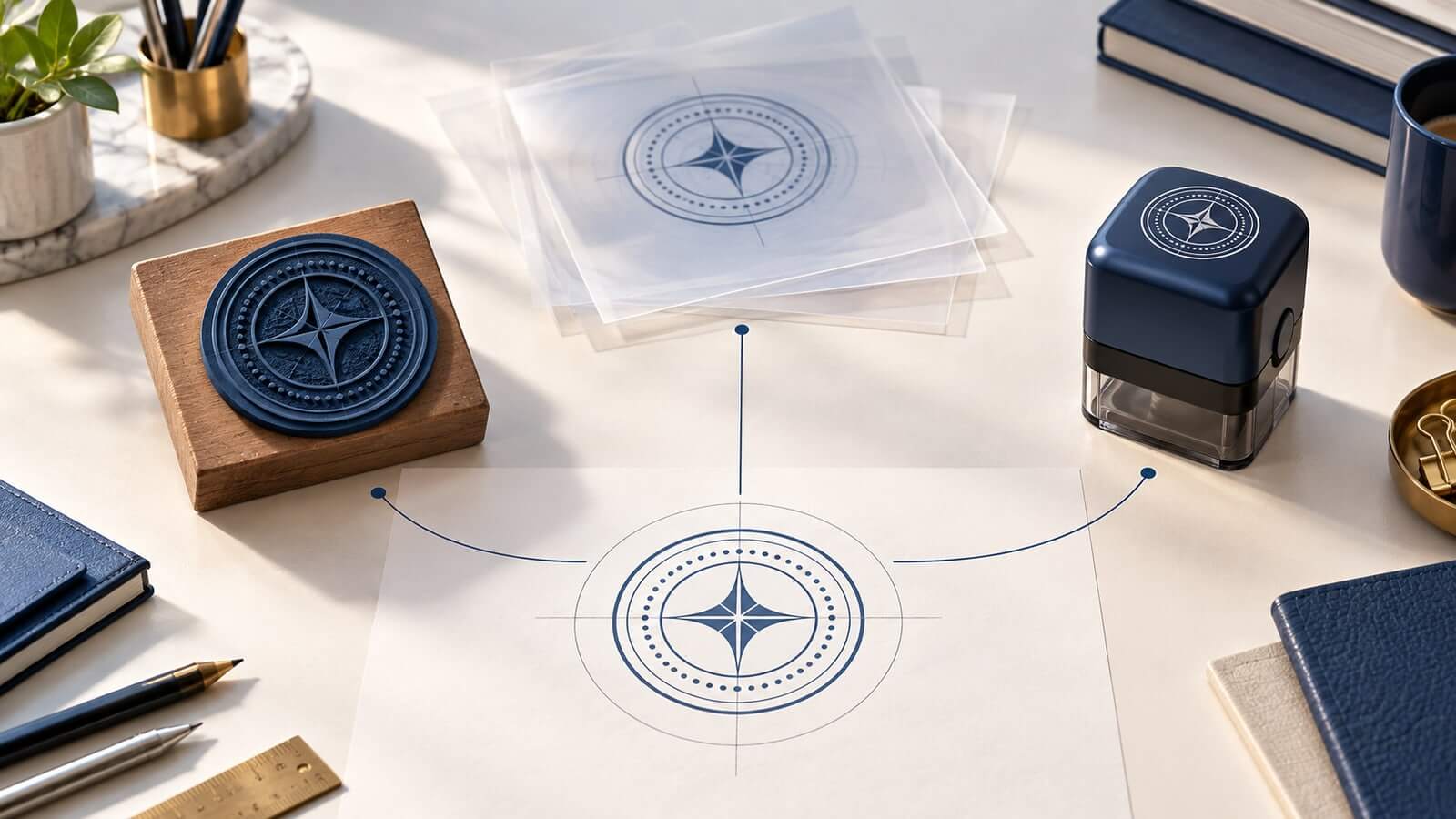
An operations team compares three versions of its company stamp. The rubber device at reception has the old address. The transparent PNG used on internal PDFs has the new address but an outdated logo. A mobile printer contains a third version with a shortened name that no one remembers approving.
The problem is not that the organization uses several technologies. The problem is that each technology has become its own source of truth.
The most practical future for stamp design is a controlled master that feeds destination-specific variants. This is a forecast, not a claim that every organization or manufacturer has adopted the model. It follows from technologies already in use: editable online artwork, vector and raster exports, laser-made rubber plates, mobile inkjet marking, document overlays, and regulated electronic trust services.
The next step is to manage their relationship without pretending they are identical.
Several facts are visible today.
Physical self-inking and hand stamps remain active product categories. Laser software can transform digital artwork into rubber relief. Mobile inkjet devices can print changing dates, numbers, barcodes, and color graphics on suitable surfaces. Visual stamp images can be placed in PDFs and office files. European trust-service rules define electronic seals as technical data, with advanced and qualified forms that are not created by drawing a seal-shaped image.
From those facts, a reasonable inference follows: stamp workflows are more likely to branch than collapse into one universal tool. The exact mix will vary by office, country, document, surface, budget, and authority.
This article uses “future” in that narrow sense. It does not predict market size, adoption dates, or the disappearance of rubber stamps. It proposes an operating model that can handle more destinations without losing control of wording and identity.
A master file is not merely the largest PNG. It is the editable, approved definition of what the stamp is allowed to say and how its core elements relate.
For a simple company mark, the master may include:
- approved organization name;
- descriptor or department;
- central symbol or monogram;
- border and text hierarchy;
- intended base shape;
- language variants;
- version owner and approval date.
Use a to establish that structure with real content. Keep live text, editable paths, and named layers where the format allows. Store a normal-reading proof beside the source so someone can verify it without specialized software.
The master should not contain every destination compromise. A tiny rubber version may need thicker lines. A PDF overlay may use transparency. A mobile printer may add a changing date. Those belong in controlled variants linked back to the master.
The phrase “same stamp” is too vague once one identity travels through different production systems.
Name variants by purpose:
company-seal-physical-38mm;company-seal-pdf-transparent;company-seal-mobile-numbered;company-seal-small-text-only.
Each name explains what may differ. The physical variant can strengthen narrow lines and remove transparency. The PDF variant can preserve a clean edge and controlled opacity. The mobile version can reserve a data zone. The small version can remove a descriptor that would not survive reduction.
Do not create variants by repeatedly exporting and editing the previous derivative. Return to the master, apply the destination rule, and record the new version. This prevents a shortened word or moved symbol from becoming the accidental basis for every later file.
The guide to explains the file-level discipline behind this approach. Future readiness depends more on traceable sources than on fashionable effects.
Laser engraving already turns digital geometry into raised rubber. Dedicated stamp modes can handle transformations such as inversion, mirroring, relief support, and cutting contours within a manufacturer’s workflow.
That does not eliminate craft. It moves the conversation. Designers need to supply cleaner geometry and clearer intent; manufacturers need to expose the production rules that affect the result. The boundary becomes a documented translation instead of a mysterious redraw.
In a mature master-file workflow, the physical variant would carry:
- exact impression dimensions;
- minimum feature adjustments approved for that supplier;
- normal-reading reference;
- production proof identity;
- sample impression;
- device and plate reference.
If the supplier or machine changes, the organization can create a new production derivative without tracing a worn impression. That is a practical advantage of digital-first preparation even when the final tool remains entirely physical.
Portable inkjet markers demonstrate a second branch. Current devices can combine static artwork with dates, numbers, codes, or other changing content. Unlike a fixed rubber plate, the impression can vary without replacing the physical plate.
The opportunity is not “put everything into a smart stamp.” It is to separate fixed identity from controlled data.
A mobile-marking variant might lock the organization name and symbol while exposing only an approved sequence or date field. The data source, operator, surface, cartridge, and review rule then become part of the workflow.
Variable output creates new failure modes. A code can point to an expired page. A numbering sequence can be restarted. A handheld pass can skew. A full-color mark can lose contrast on an absorbent surface. Future designs will need both visual rules and data rules.
For many jobs, a conventional stamp will remain simpler. A fixed RECEIVED mark with a handwritten date may be easier to maintain than a connected device. The master-file model supports that choice; it does not require the most technical output.
The word “digital seal” will continue to cause confusion unless organizations separate appearance from technical trust.
A visual seal is artwork. It can help a person recognize a department, status, or brand. It may be placed in a PDF, slide, image, or document template.
A cryptographic electronic seal is data associated with other data under a defined technical and legal framework. Advanced and qualified forms can involve certificates, validation, providers, secure creation devices, and trusted lists. Requirements vary by jurisdiction and service.
One document may display a visual company mark and also carry a valid electronic seal. The image does not create the technical seal, and the technical seal does not require an ornamental round graphic to work.
The future master should therefore record a boundary: “visual artwork only.” If a workflow requires identity proof, integrity, consent, admissibility, or regulated acceptance, route that requirement to the approved signing or trust-service system. Do not add a lock icon or certificate-style border and call the problem solved.
As outputs multiply, the file needs a small record. Useful metadata includes:
- master identifier;
- version and approval date;
- owner;
- approved wording source;
- permitted destinations;
- linked variants;
- dimensions;
- color intent;
- retirement status;
- next review date.
This can live in a simple register. It does not require an elaborate asset-management platform for a small team.
The important relationship is lineage. A reviewer should be able to answer: Which master created this file? What changed for this destination? Who approved it? Is it still current?
Avoid embedding sensitive operational data into the artwork metadata when access is broad. The register can point to a controlled record without exposing personal or confidential details in every export.
Future-focused design is not the promise that a tool will last forever. It is the ability to replace one component without rediscovering the whole system.
A rubber plate wears. A company address changes. A mobile device reaches end of support. A file format becomes inconvenient. A supplier revises its production process. A PDF tool changes how it handles transparency.
The master-and-variant model contains those changes. Replace the affected variant, test it, and record the transition. Do not automatically reissue every device when an unrelated channel changes.
This also supports more grounded sustainability decisions. Extending the life of a device, replacing only a plate or pad, avoiding unnecessary prototypes, and retaining usable source artwork may reduce waste. Exact environmental benefits depend on materials, manufacturing, transport, usage, and disposal, so they should not be claimed from file organization alone.
An organization does not need to rebuild every stamp at once.
Step 1: Inventory active marks
Photograph physical devices, collect digital files, and list mobile or document-system versions. Record where each is used.
Step 2: Group likely relatives
Place marks with the same organization, purpose, and core identity together. Do not merge marks merely because both are circular.
Step 3: Identify the approved content
Find the source for names, addresses, statuses, and symbols. When approval is unclear, stop and assign an owner rather than guessing from the newest-looking file.
Step 4: Rebuild one master
Choose a high-use family and create a clean editable definition. Preserve evidence of the old versions while the new one is reviewed.
Step 5: Derive only the needed variants
Create the physical, document, or mobile outputs currently required. Do not generate a format library with no owner or use.
Step 6: Retire superseded assets
Withdraw obsolete files and recall physical devices when the process requires it. Keep the history needed to explain the change.
Step 7: Review after a real change
Test the system when an address, supplier, device, or destination changes. The review will show whether the master contains enough information.
The future value of an online editor is not an endless gallery of effects. It is the ability to preserve structure while users make controlled changes.
Useful capabilities include editable text and geometry, actual-size planning, clear layer relationships, vector and raster exports, transparent variants, stable proofs, and reusable saved designs where access permits. Human review remains essential for wording, authority, destination, and release.
The cover current creation methods. A future-ready workflow adds governance: the editor produces an asset, while the organization decides which version is approved and what that version may be used for.
Will digital stamps replace physical rubber stamps?
Not in every workflow. Physical tools remain efficient for repeated marks on suitable surfaces, while digital images serve documents and mobile printers support variable output. The mix depends on the job.
What should be stored in the master file?
Store approved content, editable geometry, core hierarchy, and enough version information to create controlled variants. Keep a normal-reading proof alongside it.
Can one exported PNG be the master?
It is a weak master when future editing or resizing is expected. A raster export may be a useful destination file, but editable or vector source geometry usually preserves more options.
Is a visual seal a future form of electronic authentication?
Not by itself. Authentication and integrity require an appropriate technical system. A visible seal image remains a visual element unless it is paired with a separate verified trust mechanism.
Does every small business need asset-management software?
No. A clear folder structure, versioned filenames, an approval record, and a simple variant register can be enough. The discipline matters more than the platform.
The future of stamps is likely to contain more outputs, not one universal replacement. Rubber relief, mobile inkjet, document artwork, and electronic trust services address different constraints.
A controlled master file gives those outputs a shared source without pretending they are identical. Define the approved identity once, derive each destination deliberately, and retain the proof behind every release. That approach makes the stamp system easier to change precisely because no single file is asked to do every job.
